
By default, your quote form appears on all quoted products. But what if you only want the form to show on selected products or collections? With Quotes Guru’s “Show on Specific Products” feature (Pro Plan), you can precisely control where your quote form appears — giving you a more targeted and professional storefront experience.
Who Is This For? #
This feature is ideal for:
- Stores with a mix of regular and custom products — show the quote form only where needed
- Wholesale or B2B stores that want quotes only on bulk or premium items
- Merchants who want to test quote forms on select products before rolling out site-wide
How to Set Up a Quote Form for Specific Products #
- Go to Quotes Guru: RFQ & Hide Prices in your Shopify admin
- Navigate to Customize quote forms and open the quote form you want to configure
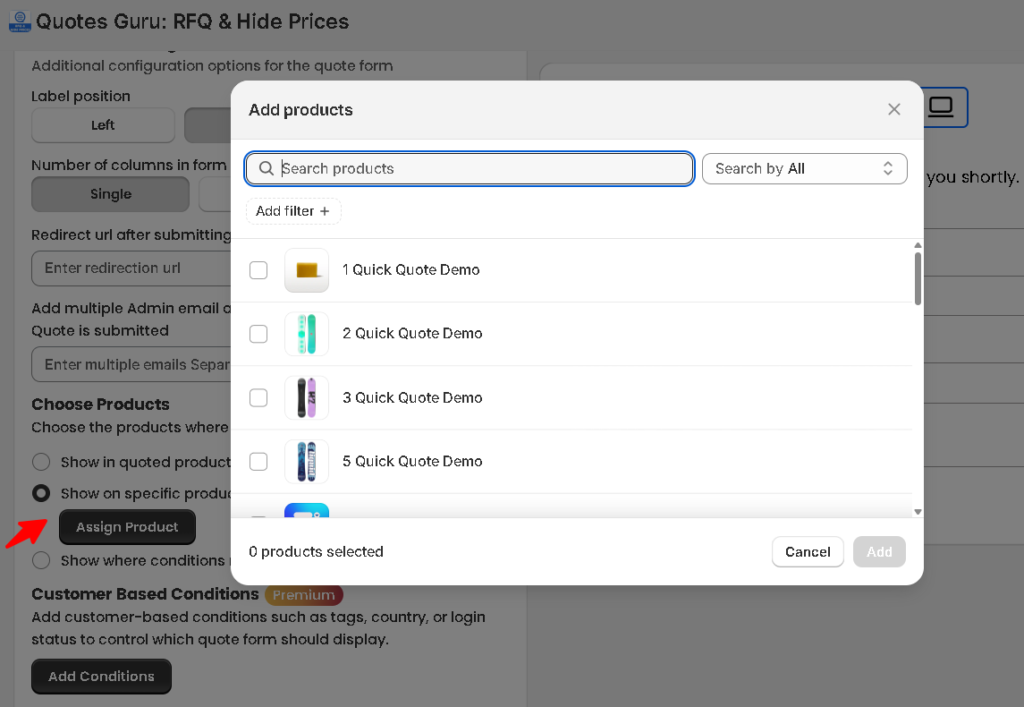
- Scroll to the Choose Products section
- Select “Show on specific products” (Pro)
- A product search field will appear — search and select the products where you want the form to display
- Click Save to apply your changes
How to Show Quote Form on Specific Collections #
If you want the form to appear across an entire collection:
- Follow the same steps above
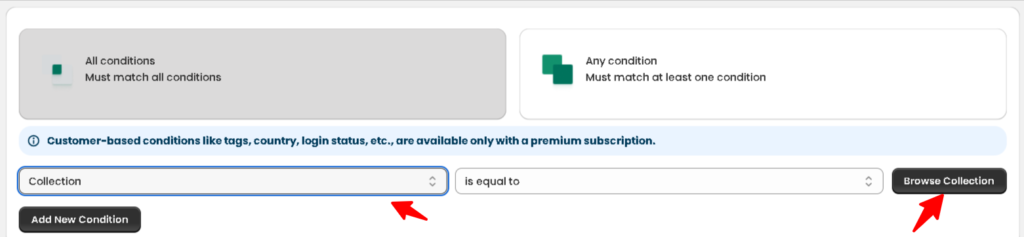
- Choose Show where conditions match, scroll below
- And choose collection, search by collection name
- Select the collection, and all products within it will be included
- Click Save
Tips #
- You can select multiple products or collections in one form
- If you have multiple quote forms, assign different products to each for a fully customized experience
- Combine with Customer-Based Conditions (Premium) to further control who sees the form on those specific products


