
Not every customer should see the same quote form. If you run a B2B store, serve international markets, or manage wholesale accounts, showing the right quote form to the right customer is critical. Quotes Guru’s Customer-Based Conditions feature (Premium) gives you full control over who sees your quote forms — based on their login status, customer tags, or country. In this guide, we’ll walk you through how to set up and use these conditions effectively —without any custom development.
This feature is available on the Premium plan and is designed to help merchants collect the right information from the right customers at the right time.
How Customer-Based Conditions Work #
When a customer opens the quote form, the app checks conditions in the following order:
- Product-based conditions (if configured)
- Customer-based conditions
- Global quote form (default fallback)
If no conditions match, the Global quote form is automatically displayed.
Available Customer-Based Conditions Types #
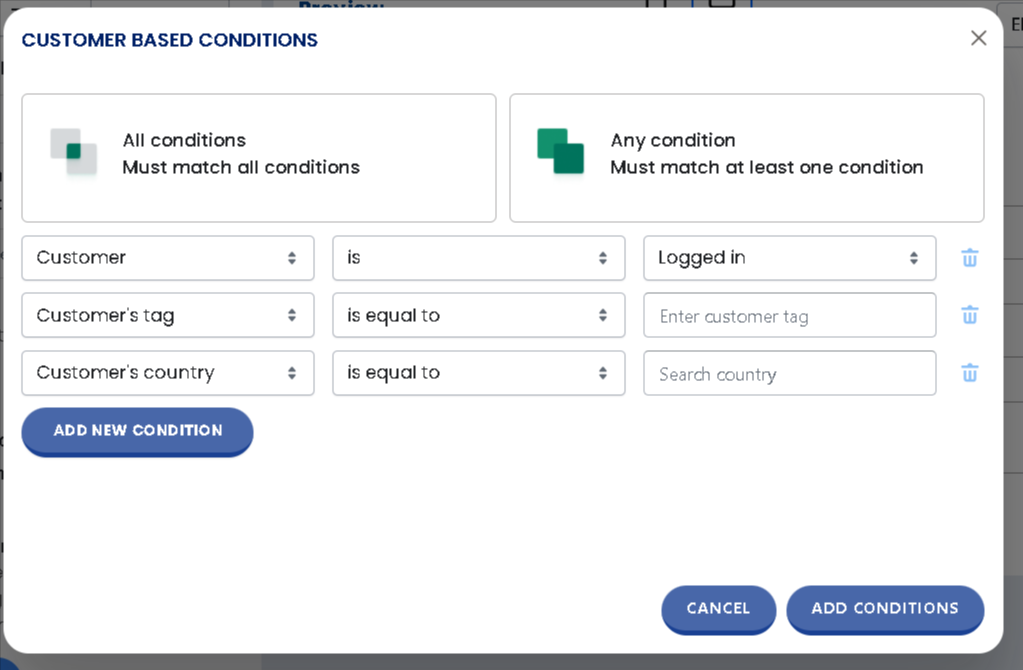
You can create one or more conditions based on the following:
1. By Login Status Show or hide the quote form based on whether a customer is logged in or browsing as a guest. #
- Use case: Display the quote form only to logged-in customers for a members-only or private wholesale portal, while showing a standard storefront to guest visitors.
2. By Customer Tag Target specific customer groups using Shopify customer tags such as “Wholesale,” “VIP,” or “Tax-Exempt.”
- Use case: Show a special wholesale quote form only to customers tagged as “Wholesale” in their Shopify profile, keeping the regular experience for retail customers.
3. By Customer’s Country Display or hide the quote form based on the customer’s country.
- Use case: Show a “Request a Quote” form to international customers while keeping a standard checkout for local buyers, or vice versa.
How to Set Up Customer-Based Conditions #
- Go to Quote Form Settings
- Scroll to the Choose Products section and select your preferred display rule.
- Select Show where conditions match
- Under Customer-Based Conditions
- Choose your condition type — Customer, Customer’s Tag, or Customer’s Country.
- Set the matching rule (e.g., Customer is Logged In, Tag is Wholesale, Country is United States).
- Select Any Condition (must match at least one) or All Conditions (must match all) depending on your needs.
- Click Save to apply the conditions.
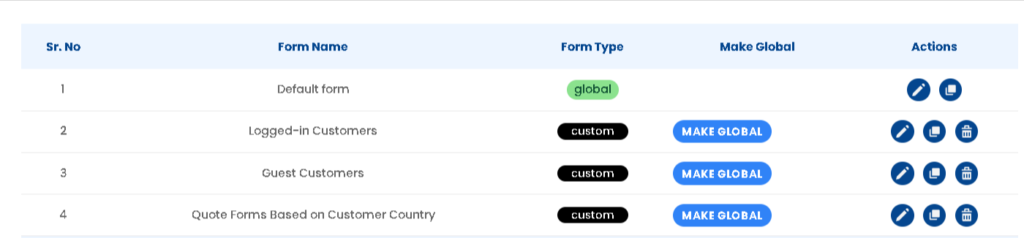
Demo Setup Available: To make this easier, we’ve already set up sample quote forms in the demo store. These forms show how customer-based conditions work in real scenarios, such as logged-in vs guest customers and country-based forms.
Demo Examples: Customer-Based Conditions in Action #
To help you understand how Customer-Based Conditions work, we’ve set up live demo examples in our store. These examples show how different quote forms are displayed based on customer login status and country.
Example 1: Different Forms for Logged-in vs Guest Customers #
Product:
https://wf-request-for-quote.myshopify.com/products/customer-based-conditions-demo
How it works:
- When a logged-in customer views this product, a specific quote form designed for logged-in users is displayed.
- When a guest customer (not logged in) views the same product, a different quote form is shown.
Why this matters:
This allows you to collect more detailed information from logged-in customers while keeping the form simple for guests.
Example 2: Country-Based Quote Form (Guest + United States) #
Collection:
https://wf-request-for-quote.myshopify.com/collections/collection-for-international-customers
Conditions used in this example:
- Customer type: Guest
- Customer country: United States
- Applied to: Collection products
How it works:
- If a guest customer from the United States visits this collection, a specific quote form is displayed.
- If the customer does not match these conditions, the Global (default) quote form is shown instead.
Why this matters:
Customer-Based Conditions in Quotes Guru give Premium users powerful control over quote form visibility. By filtering on login status, customer tags, or country, you can deliver a tailored quoting experience to every customer segment — making your store smarter and your B2B sales flow more efficient.


