
Quotes Guru allows merchants to collect an EU VAT ID directly through their quote form and validate the submitted VAT number when reviewing a quote. This is particularly useful for B2B merchants who need to identify VAT-registered customers and support applicable VAT exemption or reverse-charge processes.
Important: Quotes Guru provides VAT ID collection and validation functionality. Whether a transaction qualifies for VAT exemption, reverse charge, or another tax treatment depends on the applicable EU and national VAT rules. Merchants should verify the customer’s eligibility and apply the appropriate tax treatment.
What is an EU VAT ID? #
A VAT Identification Number (VAT ID) is a unique number issued by a national tax authority to a business or other entity registered for VAT.
VAT IDs are used to:
- Identify VAT-registered businesses.
- Determine the customer’s VAT status.
- Support B2B transactions within the EU.
- Help determine the appropriate place and treatment of taxation.
- Identify businesses for VAT invoicing and cross-border transactions.
Each EU Member State issues its own VAT identification numbers and uses its own format.
Enable EU VAT ID in Quotes Guru #
Before you can add the EU VAT ID field to your quote form, you must first enable the feature in the app settings.
Step 1: Open Miscellaneous Settings #
From your Shopify admin: Apps → Quotes Guru: RFQ → General Settings → Miscellaneous Settings
Scroll down until you find: EU VAT ID
Enable: Enable EU VAT ID Entry and Tax Exemption Support in Quotes

Add the EU VAT ID Field to Your Quote Form #
Once the EU VAT ID feature is enabled, you need to add the field to the quote form customers will use.
Step 2: Open Customize Quote Forms #
Go to: Quotes Guru: RFQ → General Settings → Customize Quote Forms
Select the quote form you want to edit.
Step 3: Add the EU VAT ID field. #
Click to add a new field.
From the available fields, select EU VAT ID
The field is available under the PREMIUM Plan.
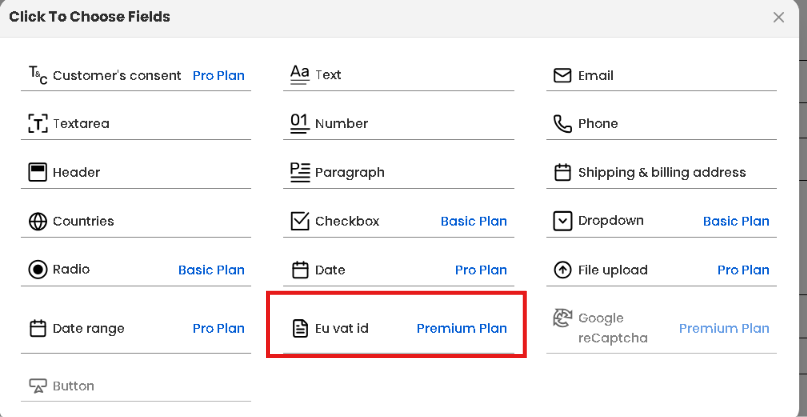
Save your quote form after adding the field.
The EU VAT ID field will now be displayed to customers when they submit a quote request.
How the Customer Submits Their VAT ID #
When a customer opens the quote form, they can enter their EU VAT ID in the EU VAT ID field.
For example: EU VAT ID: DE123456789
The exact format depends on the country that issued the VAT number.
The customer should enter the VAT ID exactly as provided by their national tax authority.
Validate a Customer’s EU VAT ID #
After the customer submits a quote, the VAT ID is displayed in the quote details.
Step 4: Open the submitted quote. #
Go to: Quotes Guru: RFQ → Quote Listing
Open the quote submitted by the customer.
In the Customer Information section, you can review the customer’s submitted information.
If an EU VAT ID was submitted, a separate EU VAT ID section will appear on the right side of the quote.
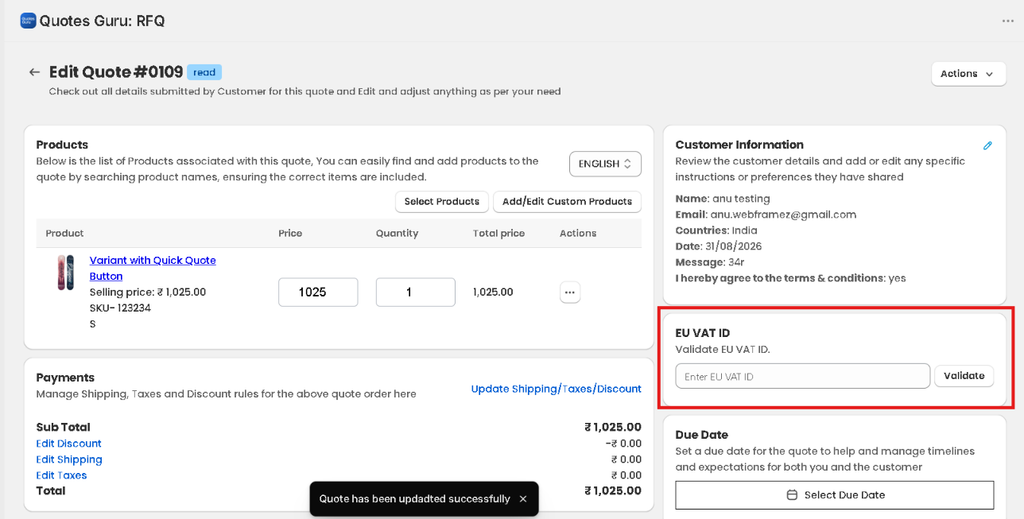
Step 5: Validate the VAT ID #
Enter or review the customer’s VAT ID and click: Validate
Quotes Guru checks the VAT number’s validity through the applicable VAT validation service.
The EU’s VIES (VAT Information Exchange System) is the European Commission’s system for checking whether a business is registered for cross-border trade within the EU.
What Does VAT Validation Mean? #
A successful validation indicates that the VAT information exists in the relevant national VAT database and is recognized by the validation system.
An unsuccessful validation can occur for several reasons, including:
- The VAT number was entered incorrectly.
- The business is not registered for VAT.
- The VAT number has not yet been activated for the relevant EU cross-border transactions.
- The national VAT database has not yet been updated.
- The validation service is temporarily unavailable.
The European Commission notes that VIES retrieves information from national VAT databases, so the information can sometimes be unavailable or differ depending on the status of the national database.
How Can a Customer Get an EU VAT ID? #
If your customer doesn’t know their VAT ID, you can direct them to their national tax authority.
There is no single EU-wide application that issues VAT numbers. VAT identification numbers are issued by the tax administration of the relevant EU Member State.
Your customer can generally follow these steps:
1. Determine where the business is registered #
The customer should identify the EU Member State where their business is established and where they need to register for VAT.
VAT registration requirements vary by country and business circumstances.
2. Check whether VAT registration is required #
The customer should check the VAT registration requirements applicable to their business.
Depending on the country and circumstances, VAT registration may be required for businesses carrying out taxable activities, intra-EU acquisitions, or certain cross-border transactions.
3. Contact the national tax authority #
The customer should apply for VAT registration through the tax authority in the relevant Member State.
The European Commission provides country-specific VAT information and links to national resources.
4. Complete the VAT registration process #
The customer may need to provide business information and other documentation requested by their national tax authority.
The exact requirements, application process, processing time, and eligibility conditions vary by country.
5. Receive the VAT identification number #
Once the registration is approved, the national tax authority issues the customer’s VAT identification number.
The VAT ID should normally also appear on relevant VAT registration documentation and may be used on business invoices.
6. Check the VAT ID in VIES #
For businesses involved in EU cross-border transactions, the customer can check whether their VAT ID is recognized in VIES.
Check a VAT number using the European Commission’s VIES tool
Important: VIES is a validation service, not a service for obtaining a VAT number. Only national tax administrations can issue VAT identification numbers.
What If the Customer’s VAT ID Is Not Valid? #
If validation fails, ask the customer to:
- Confirm that the VAT ID was entered correctly.
- Make sure the country prefix is correct.
- Check that the business is actually VAT registered.
- Confirm with their national tax authority that the VAT registration is active.
- Check whether the VAT ID is enabled for EU cross-border transactions where applicable.
- Try the validation again later if the VIES service is temporarily unavailable.
The European Commission specifically notes that VIES can occasionally be unavailable because it relies on national VAT databases.
Why Is VAT ID Validation Important for B2B Quotes? #
Collecting and validating VAT IDs can help merchants identify VAT-registered business customers before finalizing a quote.
For example, a merchant may receive:
Customer: ABC GmbH
Country: Germany
EU VAT ID: DE123456789
Validation: Valid
The merchant can then review the customer’s VAT status and determine the appropriate tax treatment for the transaction.
This can be particularly useful when managing EU cross-border B2B transactions, where VAT may be treated differently from domestic or B2C sales.
VAT Exemption and Reverse Charge #
A valid VAT ID does not automatically mean that every purchase is VAT-exempt.
The merchant should consider:
- Where the merchant is established.
- Where the customer is established.
- Whether the customer is a taxable business.
- Whether the transaction is B2B or B2C.
- Whether the goods or services qualify for a particular VAT treatment.
- Whether the applicable reverse-charge conditions are satisfied.
- Any additional requirements under the relevant Member State’s rules.
EU VAT rules include specific provisions for cross-border transactions, and national requirements can also apply.
Quotes Guru helps you collect and validate the VAT ID; it does not replace professional tax advice or the merchant’s responsibility to determine the correct VAT treatment.
Where Can Merchants Check VAT Numbers? #
Merchants can independently verify an EU VAT number through the European Commission’s VIES service.
European Commission — VIES VAT Number Validation
VIES returns information from the relevant national VAT databases. The European Commission recommends keeping records of VAT validations where appropriate for tax-control purposes.
Frequently Asked Questions #
#
No. VAT registration requirements depend on the business, its activities, turnover, and the rules of the relevant Member State. Some businesses may also qualify for specific VAT exemption schemes.
#
No. Each EU Member State issues its own VAT identification number and has its own numbering format.
#
No. VAT IDs can only be issued by the relevant national tax authority.
#
Yes. Once the customer submits their quote, you can review the VAT ID from the quote details and use the Validate button.
#
First, verify the number and country prefix. If the information is correct, the customer should contact their national tax authority to confirm their registration and cross-border status. You can also retry the validation later if the VIES service is temporarily unavailable.
#
No. VAT treatment depends on the transaction and applicable VAT rules. A valid VAT ID is one factor used when determining whether a particular B2B transaction qualifies for VAT exemption, reverse charge, or another treatment.
#
No. The European Commission provides information and validation services such as VIES, but national tax administrations issue VAT identification numbers.
#
Customers should consult the tax authority in the EU Member State where they need to register. The European Commission also provides country-specific VAT information.
EU VAT information and country-specific guidance


