
If you use Searchanise Search & Filter on your Shopify store, you can configure Quotes Guru to work smoothly with Searchanise’s product search and filtering functionality.
Why Do I Need to Configure Searchanise? #
Search and filter apps can change how products are displayed on your Shopify collection pages.
When you use Searchanise, the product grid can be rendered by Searchanise instead of your Shopify theme. This means the product grid structure and selectors provided by your theme may no longer be used in the same way.
Because of this, Quotes Guru needs to use the selectors provided by Searchanise to correctly identify products displayed through its search and filter results.
Quotes Guru provides a dedicated preset for supported Search & Filter apps. Once you select the appropriate app, Quotes Guru automatically fetches the required selectors and applies the integration.
Important: You do not need to manually add or edit product selectors. Simply select the Search & Filter app you are using and save the configuration.
How to Configure Quotes Guru with Searchanise #
Follow these steps to enable the Searchanise integration.
- From your Shopify admin, go to: Online Store → Themes
- Find your Live theme and click Edit theme.
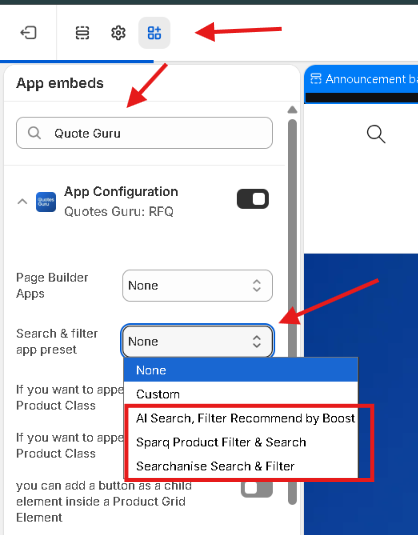
- When the Theme Editor opens, click the third icon on the left-hand side to open App embeds.
- Search for: Quote Guru App Configuration
- Click the extension to open its settings.
- Find: Search & filter app preset
- From the dropdown, Select: Searchanise Search & Filter
- Click Save in the top-right corner.
Your Quotes Guru and Searchanise configuration is now complete.
How Quotes Guru Works with Searchanise #
After you select Searchanise Search & Filter, Quotes Guru automatically fetches the selectors required to work with Searchanise.
This allows Quotes Guru to correctly work with products displayed through Searchanise’s search and filter results.
You don’t need to manually configure the selectors.
What If My Search & Filter App Is Not Listed? #
If you use a Search & Filter app that is not available in the Quotes Guru preset list, don’t worry.
Because different Search & Filter apps can use their own product grid structure and selectors, Quotes Guru may need a separate compatibility setup for that app.
Contact the Quotes Guru support team and let us know which Search & Filter app you are using. Our team can review the app and work on making Quotes Guru compatible with it.
This is especially useful if your search or filter app replaces the product grid on your collection pages.


