
If you use a Search & Filter app that is not listed in the Quotes Guru app preset, you can use the Custom option to configure quote buttons or icons on your Shopify collection pages.
The Custom Selector option allows you to provide the CSS class selectors used by your Search & Filter app or product grid. Quotes Guru uses these selectors to identify the product elements and display the quote button or icon in the desired location.
Important: Custom Selector configuration may require developer assistance. Your developer needs to identify the correct CSS class selectors from your collection page and enter them into the Quotes Guru settings.
How to Enable Custom Selectors #
- From your Shopify admin, go to: Online Store → Themes
- Find your Live theme and click Edit theme.
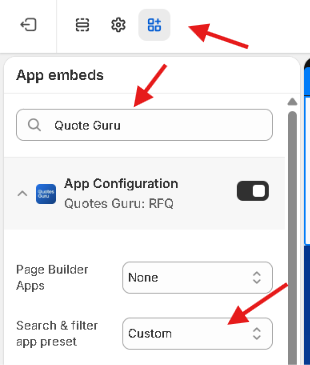
- When the Theme Editor opens, click the third icon on the left-hand side to open App embeds.
- Search for: Quote Guru App Configuration
- Click the extension to open its settings.
- Find: Search & filter app preset
- From the dropdown, Select: Custom
Configure the Custom Selectors #
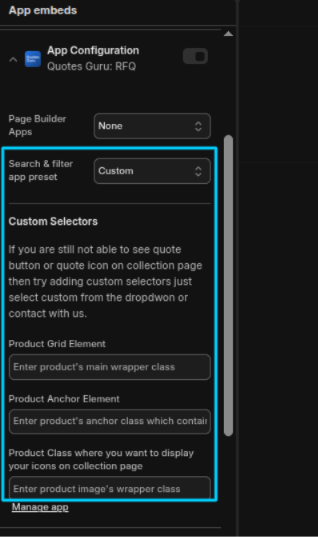
The Custom Selectors section provides three fields:
1. Product Grid Element #
Enter product’s main wrapper class
Enter the CSS class selector for the main wrapper of an individual product in your collection-page product grid.
This helps Quotes Guru identify each product displayed in the collection.
Your developer should inspect the collection-page HTML and provide the correct product wrapper class.
Example: .product-card
Use the selector format required by your store’s implementation.
2. Product Anchor Element #
Enter product’s anchor class which contains…
Enter the CSS class selector for the product’s anchor/link element.
This is generally the element that contains the product link and helps Quotes Guru identify the product associated with the quote button or icon.
Your developer should identify the correct anchor element from your product card’s HTML.
3. Product Class Where You Want to Display Your Icons #
Enter product image’s wrapper class
Enter the CSS class selector for the element where you want the Quotes Guru quote button or icon to appear on the collection page.
This tells Quotes Guru where to place the quote functionality within the product card.
For example, if you want the quote icon to appear around the product image area, your developer can provide the appropriate product image wrapper class.
Why Do I Need a Developer? #
Search & Filter apps can change or replace the product grid used by your Shopify theme.
Each app may use different HTML structures and CSS classes for:
- Product wrappers
- Product links
- Product images
- Product cards
- Product grid elements
Quotes Guru needs the correct selectors to identify these elements.
A developer can use your browser’s developer tools to inspect the collection page, identify the relevant classes, and provide them for the Custom Selector fields.
Do not enter random class names. The selectors must match the actual elements used by your collection page. Incorrect selectors may prevent the quote button or icon from appearing.
Tip: If your Search & Filter app is not currently supported by a dedicated Quotes Guru preset, you can contact us and request compatibility for the app. We can review the app and work on adding support separately.


