
Gain valuable insights into your store’s performance with the Quotes Guru Analytics Report. This dashboard provides a comprehensive view of your quotes, customer preferences, and recent activity in one place. By tracking these data-driven insights, you can identify trends, understand customer behavior, and see which products are in high demand, ensuring your business stays one step ahead.
To access the Analytic Page: #
- Open your Shopify admin.
- Go to Apps → Quotes Guru: RFQ & Hide Prices.
- Click Analytics in the app navigation menu.
- Review the quote count and quota summary cards.
- Use the Quotes Report Chart to analyze quote activity.
- Review Customer’s Favourite Products to identify popular products.
- Check Recently Quoted Products to monitor recent quote requests.
- Use the available export and pagination options to review additional data.
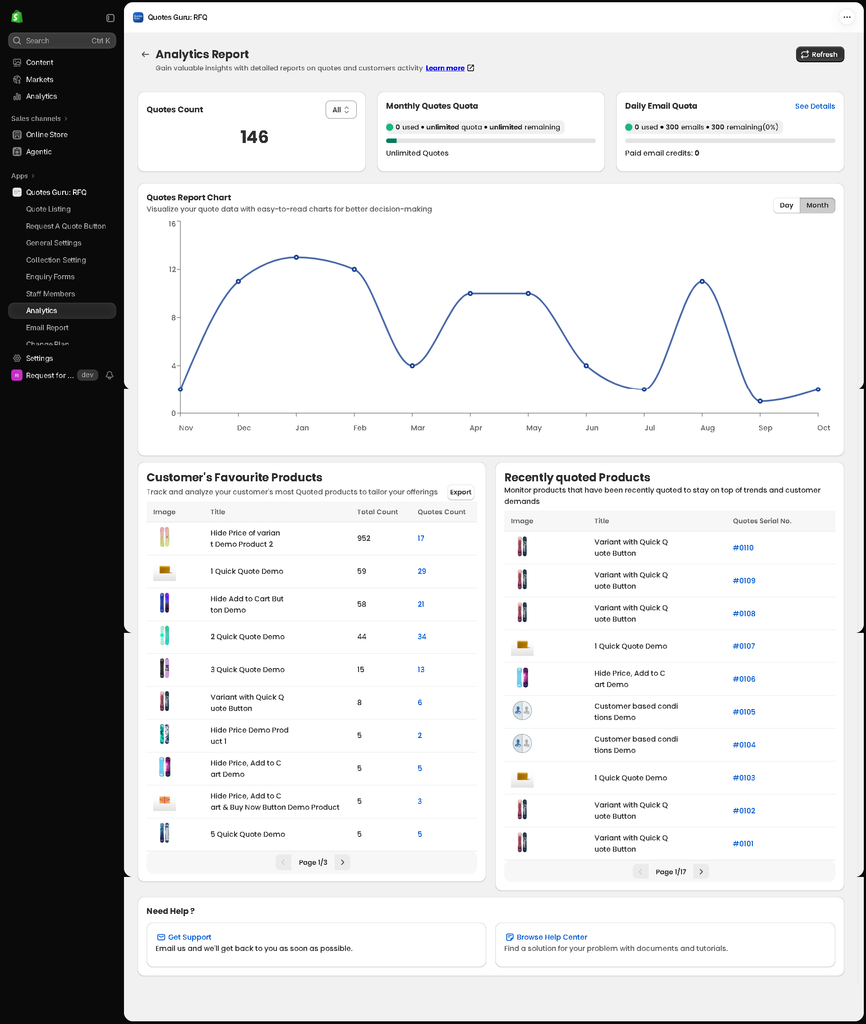
Key Features of Your Quote Analytics Dashboard: #
1. Quotes Count and Quota Overview #
At the top of the Analytics Report page, you can view key information about your quote activity and usage limits.
- Quotes Count: View the total number of quotes for the selected filter.
- Monthly Quotes Quota: Check your monthly quote usage and remaining quota.
- Daily Email Quota: Monitor your daily email usage, remaining email allowance, and available paid email credits.
- See Details: Open the detailed view of your daily email quota.
- Refresh: Refresh the report to retrieve the latest available information.
These summary cards help you quickly understand your quote activity and email usage.
2. Quotes Report Chart #
The Quotes Report Chart displays quote activity over time, helping you identify changes in customer demand.
You can switch between the available Day and Month views to review quote activity at different time intervals.
Use this chart to identify periods with higher quote activity and understand how customer interest changes over time.
3. Customer’s Favourite Products #
The Customer’s Favourite Products section highlights products that customers frequently quote.
The report includes product information and quote-related counts, helping you identify products that attract customer interest.
You can use this section to:
- Identify frequently quoted products.
- Compare customer interest across products.
- Understand which products generate more quote activity.
- Export the product report using the Export option.
- Navigate through multiple pages to review additional products.
These insights can help you prioritize popular products and make informed decisions about your product offerings.
4. Recently Quoted Products #
The Recently Quoted Products section displays products that have been quoted recently, along with their associated quote serial numbers.
You can use this section to:
- Review recent product quote activity.
- Identify products that customers have recently requested quotes for.
- Access the associated quote using its serial number, where available.
- Navigate through multiple pages to review more records.
This information helps you monitor recent customer demand and locate related quote records more easily.
Tip: Review your analytics regularly to understand customer demand, identify frequently quoted products, and monitor your app’s quote and email usage.


