
What Is Multi-Market Support in Quote Guru? #
If your Shopify store sells to customers in different countries or regions, you probably already use Shopify Markets to manage currencies, languages, and pricing. Now, Quote Guru takes that one step further — letting you control how the Request a Quote button behaves in each market, separately.
That means you can, for example:
- Show the quote button only to your Australian wholesale customers — while keeping Buy Now for everyone else.
- Hide pricing for one market but show it for another.
- Restrict add-to-cart in B2B markets and funnel those customers through a quote instead.
All of this without touching a single line of code.
💡 Important Note
If you don’t configure rules for a specific market, Quote Guru automatically uses your primary market’s rules as the default. So there’s no risk of anything breaking while you set things up.
What Do You Need Before Setting Up Multi-Market? #
Before you configure multi-market rules in Quote Guru, make sure you have:
- Quote Guru installed on your Shopify store.
- At least one additional Market created in your Shopify Admin (go to Settings → Markets). If you haven’t done this yet, set up your markets in Shopify first, then come back here.
That’s it — no developer, no theme edits, no extra apps needed.
How to Enable Multi-Market in Quote Guru App #
Before configuring any market rules, you need to turn on the Multi-Market feature inside Quote Guru:
- Open the Quote Guru app from your Shopify Admin.
- Find the Enable Multi Market toggle and turn it on.
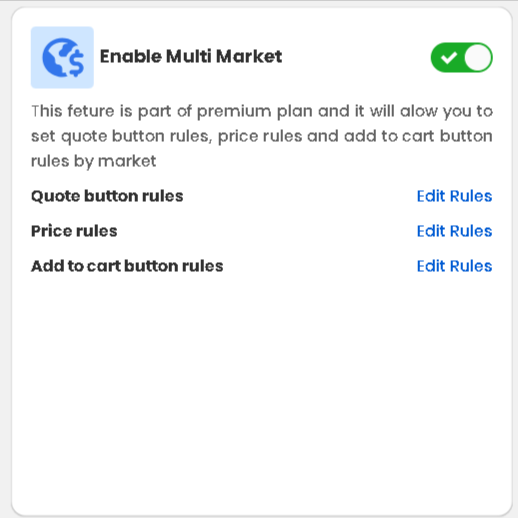
💡 Note: Multi-Market is a premium plan feature. If the toggle is greyed out or unavailable, upgrade your Quote Guru plan to access it.
How to Set Up Quote Button Rules for Each Market #
Follow these steps to configure how the Request a Quote button behaves for a specific Shopify market:
- Open the Quote Guru app from your Shopify Admin.
- In the left-side menu, click Request a Quote Button.
- Scroll down to the Quote Button Rules by Market section.
- Click Add Market. A dropdown will appear — select the market you want to configure (for example, Australia, United States, or Europe).
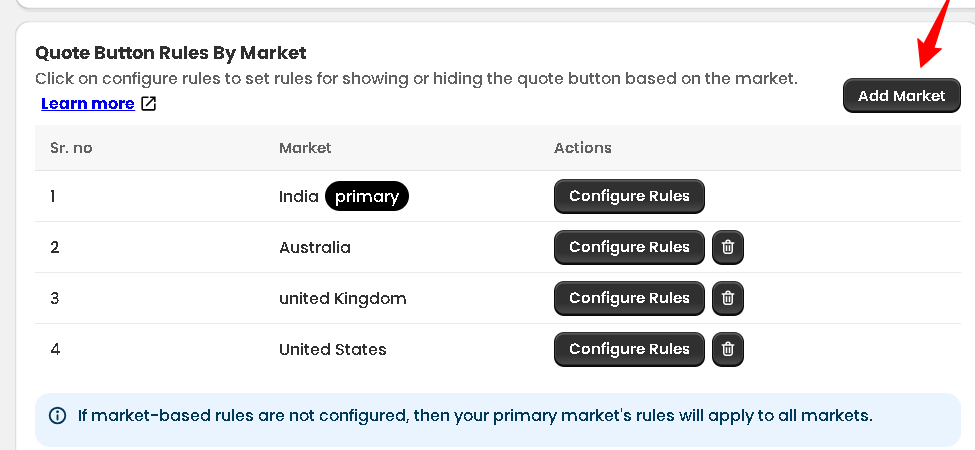
- Click Configure Rules next to the market you just added.
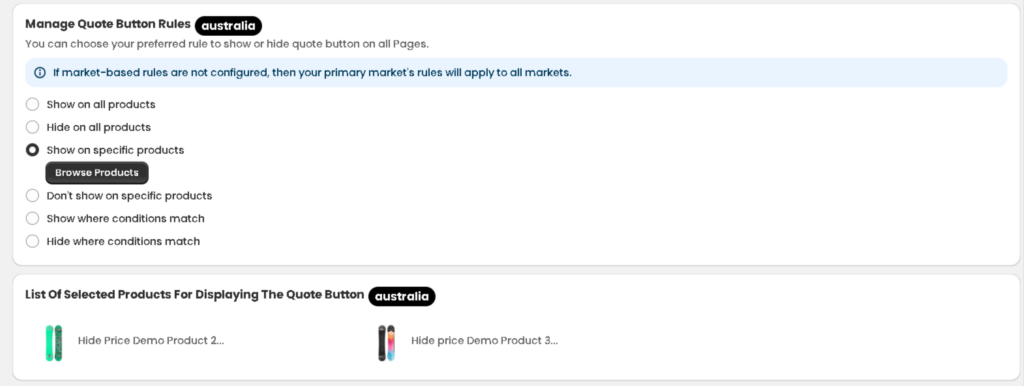
- Choose how you want the quote button to behave for this market (see the options explained below).
- Click Save. Your changes go live immediately.
Which Quote Button Rule Should You Choose? #
In Step 6, you’ll see six rule options. Here’s what each one does — and when to use it:
| Rule | What it does | Best for |
|---|---|---|
| Show on all products | The quote button appears on every product for this market. | Markets where all products are quote-only (e.g. wholesale regions). |
| Hide on all products | The quote button is completely hidden for this market. | Markets where you never want quotes — retail-only regions. |
| Show on specific products | The button only shows on products you hand-pick. | Mixed stores where only some products are quotable. |
| Don’t show on specific products | The button is hidden on selected products; visible everywhere else. | Hiding quotes on standard retail products while keeping it for custom items. |
| Show where conditions match | Button appears based on rules like product tag, collection, or price. | Advanced setups — e.g. show quote button only for products tagged ‘B2B’. |
| Hide where conditions match | Button is hidden when your conditions are met. | Hiding quotes for low-value or clearance products automatically. |
Frequently Asked Questions #
#
Nothing breaks. Quote Guru simply applies your primary market’s rules to any market you haven’t configured yet. You can set up markets one at a time and your store stays fully functional throughout.
#
You add and configure one market at a time, but you can set up as many markets as you need — there’s no limit. Each market gets its own independent rules panel.
#
Yes. Multi-market in Quote Guru works alongside Shopify’s built-in international pricing and currency features. For example, you can hide prices for one market (so customers must request a quote to see pricing) while showing full pricing with buy now in another.
#
Only after you click Save. Until then, nothing changes on your storefront. And once you save, the rules apply instantly for customers in that market.
#
Absolutely. Just go back to Request a Quote Button → Quote Button Rules by Market, click Configure Rules next to any market, make your changes, and save. Updates are instant.


