
When a customer submits a quote request, you need to make sure the right people are notified instantly. Whether it’s your sales team, support staff, or order processing department — Quotes Guru lets you add multiple email addresses to receive quote notifications, so no inquiry ever goes unnoticed.
Who Should Use This? #
This feature is ideal for:
- Stores with multiple departments — Notify sales, support, and fulfillment teams simultaneously
- Multi-manager stores — Keep all store managers in the loop on every quote request
- B2B businesses — Ensure dedicated account managers receive relevant quote notifications instantly
How to Set It Up #
Step 1: Go to Quotes Guru: RFQ & Hide Prices in your Shopify admin dashboard.
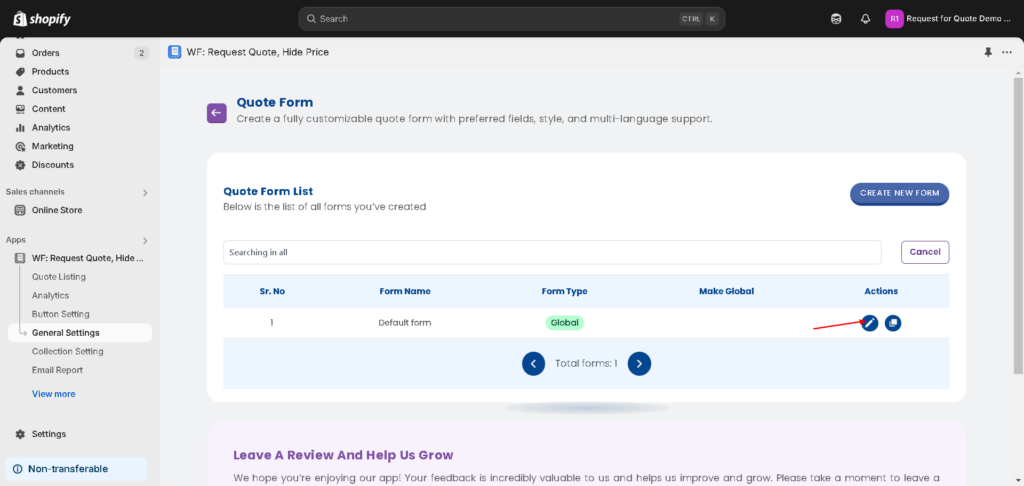
Step 2: Click on General Settings in the left sidebar.
Step 3: Click on the Quote Form tab.
Step 4: Find your quote form and click the Edit button to open the form settings.
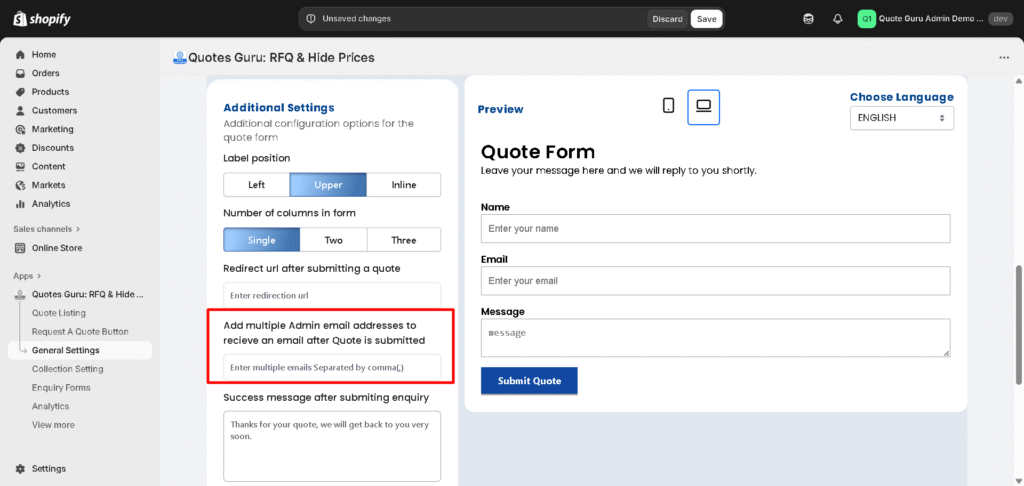
Step 5: Scroll down to the Additional Settings section.
Step 6: Find the Admin Email field and enter the email addresses where you want to receive quote notifications.
Step 7: Click Save to apply your changes.
Important Tips #
Separate multiple email addresses with a comma. Example:
sales@yourstore.com, support@yourstore.com, manager@yourstore.com
- All listed emails will receive a notification every time a new quote is submitted
- You can add as many email addresses as needed
- Department-level emails (e.g.,
sales@yourstore.com) work just as well as individual emails


