
Customer-Based Conditions allow you to control which quote form is shown to different customers based on who they are. Using this feature, you can display different quote forms depending on a customer’s login status, customer tags, or country—without any custom development.
This feature is available on the Premium plan and is designed to help merchants collect the right information from the right customers at the right time.
How Customer-Based Conditions Work #
When a customer opens the quote form, the app checks conditions in the following order:
- Product-based conditions (if configured)
- Customer-based conditions
- Global quote form (default fallback)
If no conditions match, the Global quote form is automatically displayed.
Available Customer-Based Conditions #
You can create one or more conditions based on the following:
Customer Login Status #
Show different quote forms for:
- Logged-in customers
- Guest customers
This is useful when you want a faster experience for existing customers and a more detailed form for new visitors.
Customer Tags #
Display quote forms based on Shopify customer tags such as:
subscriberwholesalevipadd_quote
This helps you personalize the quote experience for specific customer groups.
Customer Country #
Control which quote form appears based on the customer’s country.
This is especially helpful for international stores that need different shipping, tax, or address details.
How to Set Up Customer-Based Conditions #
- Go to Quote Form Settings
- Select Show where conditions match
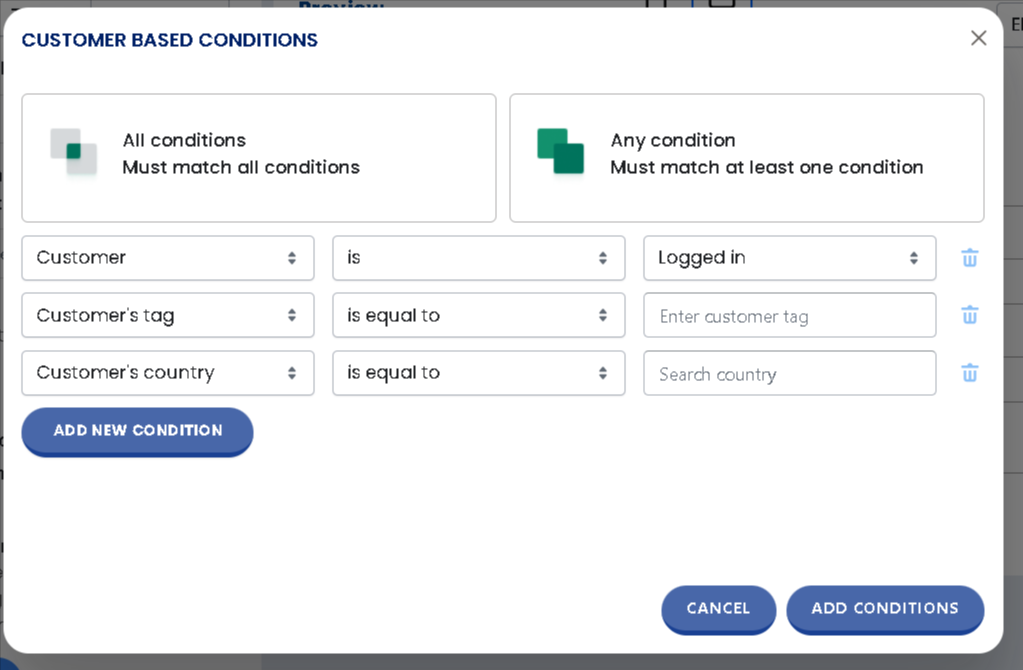
- Under Customer-Based Conditions, click Update Conditions
- Choose whether:
- All conditions must match, or
- Any condition must match
- Add your customer conditions (login status, tag, or country)
- Save the form
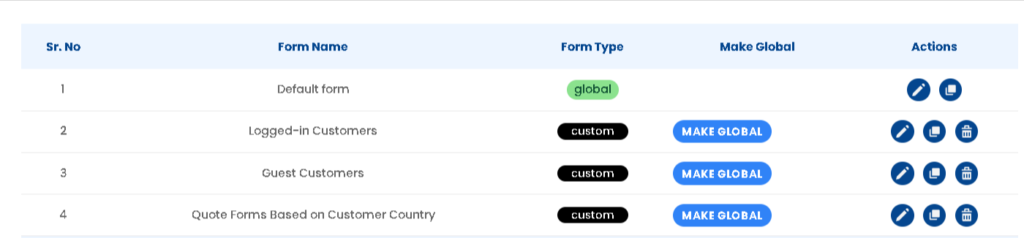
Demo Setup Available: To make this easier, we’ve already set up sample quote forms in the demo store. These forms show how customer-based conditions work in real scenarios, such as logged-in vs guest customers and country-based forms.
Demo Examples: Customer-Based Conditions in Action #
To help you understand how Customer-Based Conditions work, we’ve set up live demo examples in our store. These examples show how different quote forms are displayed based on customer login status and country.
Example 1: Different Forms for Logged-in vs Guest Customers #
Product:
https://wf-request-for-quote.myshopify.com/products/customer-based-conditions-demo
How it works:
- When a logged-in customer views this product, a specific quote form designed for logged-in users is displayed.
- When a guest customer (not logged in) views the same product, a different quote form is shown.
Why this matters:
This allows you to collect more detailed information from logged-in customers while keeping the form simple for guests.
Example 2: Country-Based Quote Form (Guest + United States) #
Collection:
https://wf-request-for-quote.myshopify.com/collections/collection-for-international-customers
Conditions used in this example:
- Customer type: Guest
- Customer country: United States
- Applied to: Collection products
How it works:
- If a guest customer from the United States visits this collection, a specific quote form is displayed.
- If the customer does not match these conditions, the Global (default) quote form is shown instead.
Why this matters:
You can tailor quote forms based on location to ask region-specific questions, apply compliance rules, or customize the buying experience.


